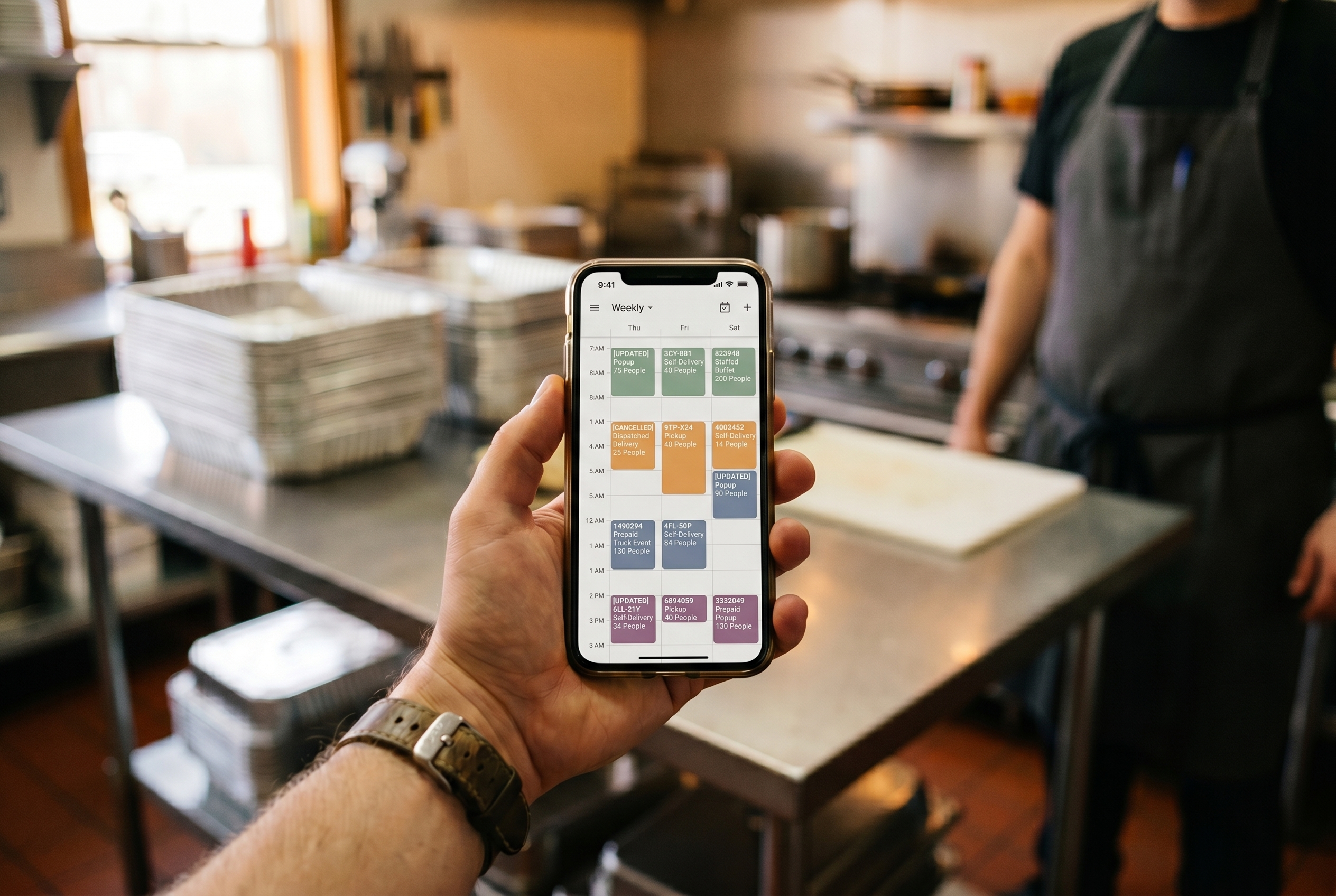
Catero auto‑reads catering orders from ezCater, DoorDash, Grubhub, Square, and more — and drops them straight onto your Google Calendar. Color‑coded, with whatever details you need. Updated in real time. Hands off.
One email when we launch. No noise, no spam.
You're on the list.
We'll send a single email to the day Catero opens up. Questions in the meantime? Reach us at onboarding@catero.app.
— Built for orders from —
ezCater
DoorDash
Grubhub
Square
Bentobox
Fooda
CaterCow
Roaming Hunger
cater2.me
+ more
The kitchen is busy. The software shouldn't be.
01 / The problem
Every platform speaks a different language.
If you run a catering business today, your orders show up in a chaotic mix of places. Every platform does it
differently, and somebody on your team spends hours every week reading those emails and copy‑pasting the details into a calendar so the kitchen knows what to make and
when.
ezCater
Sends an email with a link.
EMAIL LINK
DoorDash
Sends another, formatted entirely differently.
HTML email
Fooda
PDF attachment.
PDF
Bentobox
Formats details in pretty HTML.
Rich HTML
Square
Online orders in pretty HTML, invoices in PDF.
Rich HTML / PDF
That's the problem Catero solves.
02 / The fix
Orders, automatically on your calendar.
An order comes in from any of the platforms you use. Within seconds, Catero reads it automatically, pulls out everything that matters — the items, quantities, drop‑off time, customer name, contact info, address, special instructions — and drops it neatly onto your Catero Calendar and Google Calendar.
You decide what appears on each entry — start from one of our templates or build your own, with all of those details or just the ones your kitchen actually needs. Color-coding is yours to set too — by platform, by order type (pickup, drop-off, third-party delivery, staffed event), by status (original, modified, cancelled), by location, or any combination that fits how you work. Color by platform, and you can see at a glance whether tomorrow's lunch rush is heavy on ezCater or DoorDash. If the customer changes their order, Catero updates the calendar entry. If they cancel, Catero removes it. Nobody has to lift a finger.
03 / Where it lives
The same calendar your team already opens.
Because it also lives on Google Calendar — the same calendar your kitchen lead, your delivery drivers, and your owner already check on their phones — there's no new app to download, no new login for your staff, no learning curve. The orders just appear where everyone is already looking.
04 / Reliability
Always watching, even when you're not.
If one of the order platforms changes how their emails look (which happens more than you'd think) and an order doesn't parse correctly, Catero catches it immediately, alerts our team, and routes the order to a manual review queue so it still makes it to your calendar — usually before you even realize anything went sideways.
You get a live status page that shows at a glance which platforms are running smoothly — so if something's off, you'll know before your customers do.
status.catero.app● All systems operational
ezCater parser100.0%
DoorDash parser99.98%
Grubhub parser99.71%
Calendar sync100.0%
05 / Setup
Live in under an hour.
Setting it up takes minutes, not weeks. For most platforms, you paste in an API key or set up an email forwarding rule, and you're done. Within an hour of signing up, your next order will appear on your calendar automatically.
Connect Google Calendar
One click. We handle OAuth, scopes, and the boring parts.
Add your platforms
Paste an API key or set up an email forwarding rule — usually a couple minutes per platform.
Start cooking
Your next incoming order lands on the calendar. No CSV imports. No backfill.
Average time to first synced order · under 60 minutes
∎ The bottom line
Five to fifteen hours a week of data entry — gone.
Catering ops managers spend those hours every week doing work a computer should be doing. Catero gives them back. Your team stops copy‑pasting and starts cooking.
→ Be there at launch
Get the email when Catero opens up.
One email when we launch. No noise, no spam — same as up top, in case you scrolled.
We'll only write you once — the day Catero opens up.
You're on the list.
We'll send a single email to the day Catero opens up. Questions in the meantime? Reach us at onboarding@catero.app.